Decypharr
Decypharr is an all-in-one debrid client that handles torrent management, mounting, and symlink delivery in a single container. It replaces the Zurg + rclone stack and integrates directly with cli_debrid via a blackhole/symlink workflow.
flowchart LR
    A["Debrid cloud"] --> B["Decypharr\nDFS / rclone mount"]
    B -->|"option 1\ndirect"| E["Media Server\nPlex / Jellyfin / Emby"]
    B --> D["cli_debrid"]
    D -->|"option 2\nsymlinks"| F["Symlinks"]
    F --> E
    D -->|"triggers scan"| E
Nothing is stored locally
Decypharr streams content directly from Real-Debrid. No files are downloaded to your server.
Prerequisites
- A paid debrid service account (e.g. Real-Debrid, AllDebrid, Torbox)
- Your debrid API token — found in your debrid provider's account settings
/dev/fuseavailable on the host (required for mounting)
Installation
services:
  decypharr:
    image: cy01/blackhole:beta
    container_name: decypharr
    restart: unless-stopped
    network_mode: bridge
    ports:
      - "8282:8282/tcp"
    volumes:
      - /path/to/debrid:/mnt:rw,shared     # (1)
      - /path/to/cache:/cache:rw # (2)
      - /path/to/appdata:/app:rw  # (3)
    devices:
      - /dev/fuse:/dev/fuse:rwm
    cap_add:
      - SYS_ADMIN
    security_opt:
      - apparmor:unconfined
    environment:
      - TZ=America/New_York
- Host path where your debrid library will be mounted — point Plex and cli_debrid here
- Cache directory for rclone VFS or DFS chunk cache
- Config file, database, and downloads folder
Unraid users
Use the actual pool path for the mount volume (e.g. /path/to/cache/decypharr), not the user share path. This avoids array startup issues.
docker create \
  --name='decypharr' \
  --net='bridge' \
  --pids-limit 2048 \
  --privileged=true \
  -e TZ="America/New_York" \
  -p '8282:8282/tcp' \
  -v '/path/to/debrid':'/mnt':'rw,shared' \
  -v '/path/to/cache':'/cache':'rw' \
  -v '/path/to/appdata':'/app':'rw' \
  --device /dev/fuse:/dev/fuse:rwm \
  --cap-add SYS_ADMIN \
  --security-opt apparmor:unconfined \
  cy01/blackhole:beta

docker start decypharr
docker logs -f decypharr
Unraid users
Use the actual pool path for the mount volume (e.g. /path/to/cache/decypharr), not the user share path. This avoids array startup issues.
The simplest method — installs with a pre-configured template.
Step 1 — Open Community Applications
In the Unraid web UI, click the Apps tab.
Step 2 — Search for Decypharr
Type decypharr in the search bar and press Enter.
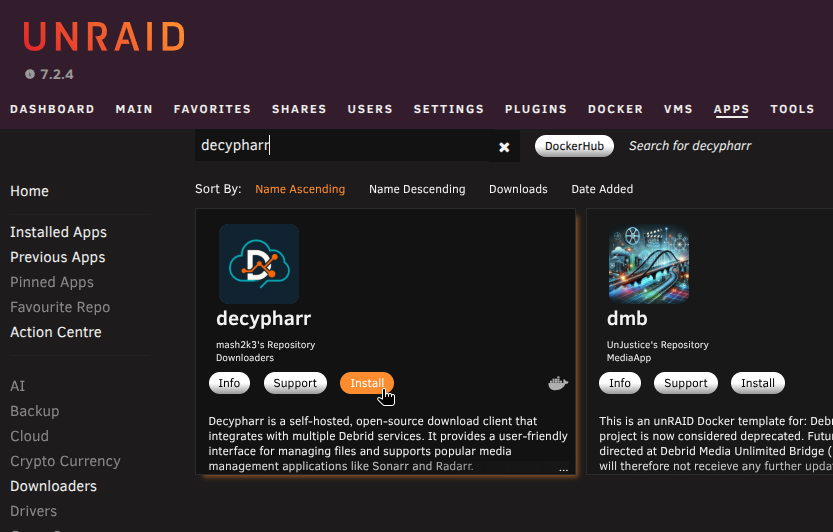
Step 3 — Install the template
Click Install on the template by mash2k3.
Step 4 — Configure the template
Fill in the template fields:
| Field | Value |
|---|---|
| Port | 8282 |
| rclone | Your debrid mount path (e.g. /path/to/debrid) → /mnt |
| cache | Your cache path (e.g. /path/to/cache) → /cache |
| config | Your appdata path (e.g. /path/to/appdata/decypharr) → /app |
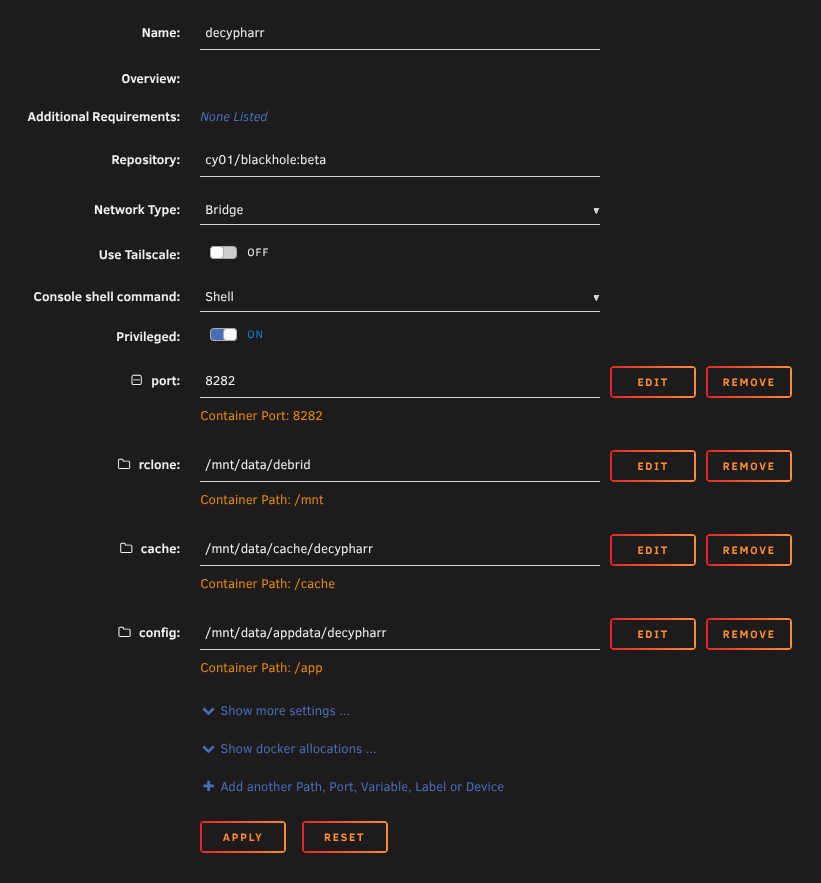
Use the :latest tag
The repository is cy01/blackhole:latest for the stable release. Use cy01/blackhole:beta only if you want early access to new features — beta builds may be less stable.
Step 5 — Apply
Click Apply. Unraid pulls the image and starts the container.
Unraid users
Use the actual pool path for the mount volume (e.g. /path/to/cache/decypharr), not the user share path. This avoids array startup issues.
Paste the same compose file from the Docker Compose tab into your stack editor and deploy.
- Portainer: Stacks → Add Stack → paste → Deploy
- Dockge: + Compose → paste → Deploy
- Dockhand: Stacks → + Create → paste → Create & Start
The binary method runs Decypharr as a process directly on your Linux host — no Docker required.
Step 1 — Create the appdata folder
Step 2 — Download Decypharr
- Go to Decypharr releases on GitHub
- Download the latest release for your platform:
- Linux x64:
decypharr_linux_amd64.tar.gz - Linux ARM64:
decypharr_linux_arm64.tar.gz
- Linux x64:
- Extract the archive:
- Place the extracted binary in your appdata folder and make it executable:
Step 3 — Create config.json
Create a config.json in your appdata folder. The web UI at http://YOUR_SERVER_IP:8282 can also be used to generate this after first run — see Configuration below.
Step 4 — Start Decypharr
Run the binary, pointing it at your config file:
To run it as a background service, create a systemd unit:
[Unit]
Description=Decypharr debrid client
After=network.target

[Service]
WorkingDirectory=/home/YOUR_USER/decypharr
ExecStart=/home/YOUR_USER/decypharr/decypharr --config /home/YOUR_USER/decypharr/
Restart=always

[Install]
WantedBy=multi-user.target
Step 5 — Verify
Open the Decypharr web UI to confirm it is running and connected:
Run Decypharr as a binary on Unraid using User Scripts — useful if you prefer to avoid Docker or want tighter control over the process.
Step 1 — Create the appdata folder
Step 2 — Download Decypharr
- Go to Decypharr releases on GitHub
- Download the latest
decypharr_linux_amd64.tar.gz - Extract the archive and place the
decypharrbinary in your appdata folder:
tar -xzf decypharr_linux_amd64.tar.gz
cp decypharr /path/to/appdata/decypharr/
chmod +x /path/to/appdata/decypharr/decypharr
Step 3 — Create config.json
Create a config.json in /path/to/appdata/decypharr/. The web UI at http://YOUR_SERVER_IP:8282 can also be used to generate and edit settings after first run — see Configuration below.
Step 4 — Create User Scripts
Go to Settings → User Scripts and create the following scripts:
Script 1 — Start Decypharr (Schedule: At Startup of Array)
#!/bin/bash
chmod +x /path/to/appdata/decypharr/decypharr
/path/to/appdata/decypharr/decypharr --config /path/to/appdata/decypharr/ &
Always use Run in Background
When running manually from User Scripts, always click RUN IN BACKGROUND.
Script 2 — Stop Decypharr (Schedule: At Stopping of Array)
This script is important
Without a stop script, stopping the array while Decypharr holds a FUSE mount can cause an unclean shutdown and trigger a parity check.
Step 5 — Verify
Open the Decypharr web UI to confirm it is running:
Decypharr has a native Windows binary — no Docker required.
Step 1 — Download Decypharr
- Go to Decypharr releases on GitHub
- Download the latest
decypharr_windows_amd64.zip - Extract the zip and place
decypharr.exein a permanent folder (e.g.C:\decypharr\)
Step 2 — Create config.json
Create a config.json in the same folder. The web UI at http://localhost:8282 can also be used to generate and edit settings after first run — see Configuration below.
Step 3 — Run Decypharr
Open a terminal in the folder and run:
Step 4 — Run at startup (optional)
To start Decypharr automatically when Windows boots:
- Press
Win + R, typeshell:startup, press Enter - Create a shortcut to
decypharr.exein the folder that opens, with--config C:\decypharr\as the argument
Alternatively, use Task Scheduler to create a task that runs decypharr.exe at logon with the config argument.
Step 5 — Verify
Open the Decypharr web UI to confirm it is running:
Configuration
Decypharr is configured via a config.json file placed in your appdata folder (/app inside the container). The web UI at http://YOUR_SERVER_IP:8282 can also be used to edit settings after first run.
Debrid provider
Add your Real-Debrid API key and tune the connection settings:
| Setting | Value | Description |
|---|---|---|
provider |
realdebrid |
Debrid provider name |
api_key |
YOUR_API_KEY |
Your Real-Debrid API token |
rate_limit |
250/minute |
Matches Real-Debrid's default API limit |
minimum_free_slot |
1 |
Minimum available download slots before queueing |
torrents_refresh_interval |
15s |
How often to poll Real-Debrid for torrent changes |
download_links_refresh_interval |
40m |
How often to refresh expiring download links |
workers |
600 |
Concurrent link-generation workers — suitable for large libraries |
auto_expire_links_after |
3d |
How long to cache links before forcing a refresh |
Mount mode
Decypharr supports two mount backends. Choose one:
DFS is Decypharr's native mount system — lighter than rclone with no separate binary required.
| Setting | Value | Description |
|---|---|---|
type |
dfs |
Selects the DFS mount backend |
mount_path |
/mnt |
Where the library is mounted inside the container |
cache_expiry |
24h |
How long file metadata is cached |
cache_dir |
/cache/dfs |
Where DFS stores its chunk cache |
disk_cache_size |
500MB |
Max cache size on disk |
chunk_size |
8MB |
Read chunk size — increase if experiencing stuttering |
read_ahead_size |
128MB |
How much to buffer ahead during playback |
uid / gid |
1000 / 1000 |
File ownership for the mount |
allow_other |
true |
Required so Plex can access the mount |
rclone mode uses an embedded rclone binary with a full VFS cache. More compatible but heavier on disk I/O.
| Setting | Value | Description |
|---|---|---|
type |
rclone |
Selects the rclone mount backend |
mount_path |
/mnt |
Where the library is mounted inside the container |
port |
5572 |
rclone RC API port |
cache_dir |
/cache |
VFS cache location |
vfs_cache_mode |
full |
Full VFS cache for best compatibility |
vfs_cache_max_age |
5h |
How long cached chunks are kept |
vfs_cache_max_size |
12G |
Maximum VFS cache size on disk |
vfs_read_chunk_size |
128M |
Initial read chunk size |
transfers |
6 |
Parallel download streams |
uid / gid |
1000 / 1000 |
File ownership for the mount |
no_checksum |
true |
Skips checksum verification for faster streaming |
Use this when managing the rclone mount yourself outside of Decypharr — for example via Unraid User Scripts. Decypharr exposes its library as a WebDAV source (decypharr:) which rclone mounts to a local path.
Prerequisite
The rclone Unraid plugin must be installed to have the rclone and fusermount commands available. Install it from the Apps tab in the Unraid web UI.
Mount script (At Startup of Array)
#!/bin/bash
sleep 10    # (1)
rclone mount decypharr: /path/to/debrid \
  --dir-cache-time 20s \
  --config=/path/to/appdata/decypharr/rclone/rclone.conf \
  --allow-other \
  --allow-non-empty \
  --gid 100 \
  --uid 1000 \
  --vfs-cache-mode full \
  --vfs-cache-max-age 5h \
  --vfs-cache-max-size 12G \
  --cache-dir /path/to/cache/decypharr \
  --retries 0 \
  --low-level-retries 0 \
  --daemon
- Give Decypharr time to start up before rclone tries to connect
Always use Run in Background
When running this script manually from User Scripts, always click RUN IN BACKGROUND.
Unmount script (At Stopping of Array)
This script is critical
Without it, stopping the array while the FUSE mount is active causes a "Retry un-mounting disks" error and forces an unclean shutdown and parity check.
Adjust /path/to/debrid, the rclone.conf path, and --cache-dir to match your actual paths.
Combining with the Decypharr binary scripts
If you are also running Decypharr as a binary (see the Binary (Unraid) tab), you can combine these into the same User Scripts rather than maintaining separate ones. Start Decypharr first, add a sleep to give it time to initialise, then run the rclone mount. On shutdown, unmount rclone first, then stop Decypharr.
Combined startup script:
#!/bin/bash
# Start Decypharr
chmod +x /path/to/appdata/decypharr/decypharr
/path/to/appdata/decypharr/decypharr --config /path/to/appdata/decypharr/ &
# Wait for Decypharr to initialise before mounting
sleep 15
# Mount with rclone
rclone mount decypharr: /path/to/debrid \
  --dir-cache-time 20s \
  --config=/path/to/appdata/decypharr/rclone/rclone.conf \
  --allow-other \
  --allow-non-empty \
  --gid 100 \
  --uid 1000 \
  --vfs-cache-mode full \
  --vfs-cache-max-age 5h \
  --vfs-cache-max-size 12G \
  --cache-dir /path/to/cache/decypharr \
  --retries 0 \
  --low-level-retries 0 \
  --daemon
Combined stop script:
Content routing
Decypharr sorts incoming torrents into subfolders using custom_folders. Each folder has regex filters that match against the torrent name and file list:
shows
| Filter | Pattern |
|---|---|
regex |
(?i)(S[0-9]{2,3}|SEASONS?(?:[0-9]{1,2})(?:[.\s_\-E]|$)|Sezon[.\s]?\d+|Season[.\s]?(?:[0-9]{1,2})(?:[.\s_\-E(]|$)|\(Season\s+[0-9]+\)|Seasons\s+[0-9]|Complete.Series|[^457a-z\W\s]-[0-9]+|(19|20)([0-9]{2}\.[0-9]{2}\.[0-9]{2}\.)) |
files_regex |
(?i)(S[0-9]{2,3}E[0-9]{2}|S[0-9]{2,3}P[0-9]{2}|[.\s_]S[0-9]{2,3}[.\s_\-E]|[0-9]{4}\.[0-9]{2}\.[0-9]{2}\.) |
movies
| Filter | Pattern |
|---|---|
regex |
(?i)(?:[A-Za-z0-9-]*[A-Za-z][. ](19|20)[0-9]{2}(?:[. ](?:[A-RT-Za-rt-z0-9'][A-Za-z0-9'._+=-]*|[Ss][A-Za-z][A-Za-z0-9'._+=-]*))*[. -](?:4[Kk][.-])?(2160|1080|720|480)[pi]|\b[0-9]{1,4}\.(19|20)[0-9]{2}(?:[. ](?:[A-RT-Za-rt-z0-9'][A-Za-z0-9'._+=-]*|[Ss][A-Za-z][A-Za-z0-9'._+=-]*))*[. -](?:4[Kk][.-])?(2160|1080|720|480)[pi]|\((19|20)[0-9]{2}\)\s*[\[(]?(2160|1080|720|480)[pi]|[A-Za-z][A-Za-z0-9 ]+ (19|20)[0-9]{2} (?:[A-Za-z]+ )?(2160|1080|720|480)[pi]|\[(19|20)[0-9]{2}\][^\n]{0,20}?(2160|1080|720|480)[pi]|[A-Za-z][A-Za-z0-9.-]*[. ](19|20)[0-9]{2}[+](2160|1080|720|480)[pi]|[A-Za-z][A-Za-z0-9_]+_\((19|20)[0-9]{2}\)_(2160|1080|720|480)[pi]|[\[(. ](19|20)[0-9]{2}[\]). _\-]|[\[(. ](19|20)[0-9]{2}$|[A-Za-z0-9][!.](19|20)[0-9]{2}[. ]) |
not_regex |
(?i)(S[0-9]{2,3}E[0-9]{2}|S[0-9]{2,3}P[0-9]{2}|[.\s_]S[0-9]{2,3}[.\s_E\-]|[\[(]S[0-9]{2,3}[\])]|S[0-9]{2,3}-S[0-9]{2,3}|Season[.\s]?(?:[0-9]{1,2})(?:[.\s_\-E(]|$)|SEASONS?(?:[0-9]{1,2})(?:[.\s_\-E]|$)|\(Season\s+[0-9]+\)|Seasons\s+[0-9]|Sezon[.\s]?\d+|Complete[.\s]Series|[0-9]{4}\.[0-9]{2}\.[0-9]{2}\.) |
default
| Filter | Pattern |
|---|---|
not_regex |
(?i)(S[0-9]{2,3}E[0-9]{2}|S[0-9]{2,3}P[0-9]{2}|[.\s_]S[0-9]{2,3}[.\s_E\-]|[\[(]S[0-9]{2,3}[\])]|S[0-9]{2,3}-S[0-9]{2,3}|Season[.\s]?(?:[0-9]{1,2})(?:[.\s_\-E(]|$)|SEASONS?(?:[0-9]{1,2})(?:[.\s_\-E]|$)|\(Season\s+[0-9]+\)|Seasons\s+[0-9]|Sezon[.\s]?\d+|Complete[.\s]Series|\(Batch\)|[0-9]{4}\.[0-9]{2}\.[0-9]{2}\.|^UFC[.\s]\d\d\d|(19|20)[0-9]{2}) |
not_files_regex |
(?i)(S[0-9]{2,3}E[0-9]{2}|S[0-9]{2,3}P[0-9]{2}|[.\s_]S[0-9]{2,3}[.\s_\-E]|[0-9]{4}\.[0-9]{2}\.[0-9]{2}\.) |
The categories setting (sonarr, radarr) maps to qBittorrent-compatible categories so arr apps can route downloads to the correct folder.
default_download_action: symlink makes Decypharr create symlinks into the mount rather than downloading files — this is required for cli_debrid to work correctly.
Configuring cli_debrid
In cli_debrid settings, set Original Files Path to the host path where your debrid library is mounted:
This is the same path Plex uses — cli_debrid follows symlinks back to this location to check file existence and build its own symlinks.
Verify the setup
Check the mount is populated:
You should see your content folders from Real-Debrid. Open the web UI to confirm Decypharr is connected:
Troubleshooting
Mount folder is empty after startup
- Check container logs:
docker logs decypharr - Confirm
/dev/fuseexists on the host:ls -la /dev/fuse - Confirm
SYS_ADMINandapparmor:unconfinedare set on the container
"Transport endpoint is not connected"
The FUSE mount dropped. Restart the container:
DFS: files appear but won't play smoothly
Increase read_ahead_size (e.g. 256MB) or switch to rclone mode.
rclone mode: container exits immediately
Verify the cache path exists on the host and is writable. Also check docker logs decypharr for the specific error.
Usenet with Decypharr
Decypharr also supports Usenet downloads. cli_debrid can submit NZBs to Decypharr from Newznab scrapers and manage them through the same queue as debrid torrents.
Usenet provider settings
In Settings → Required Settings → Usenet Provider:
| Setting | Description |
|---|---|
| Enabled | Turn on Usenet support |
| URL | Decypharr base URL (e.g. http://decypharr:8888) |
| API Token | Decypharr API token (if authentication is enabled) |
| Download Folder | Optional override for the download destination inside Decypharr |
| Decypharr Data Path | Path to Decypharr's data directory inside the cli_debrid container — used for DB backup and cleanup tools. Add - /path/to/appdata/decypharr:/decypharr_data to your docker-compose volumes, then set this to /decypharr_data |
Decypharr DB tools
When Decypharr Data Path is configured, additional tools appear in Debug Functions:
- Decypharr DB Cleanup (Library tab) — remove entries for a specific debrid provider from Decypharr's
entries.dbanditems.dbusing infohash matching. Useful when migrating away from a debrid provider. - Backup Decypharr Databases (Database tab) — backs up
entries.dbanditems.dbon the same schedule as the CLI database backup - Restore Decypharr Database from Backup (Database tab) — restore from a previous backup
- Clean Up Old Decypharr Backup Files (Database tab) — remove old backup files to free disk space
See Usenet Migration for the full Usenet setup guide.
Further reading
- Decypharr GitHub (beta)
- Newznab scrapers — add Usenet indexers
- Usenet Migration — migrate your library to Usenet and manage NZB health
- Configure Plex to add libraries pointing at your mount path
- Configure cli_debrid with the correct Original Files Path