Scrapers
Scrapers are the search engines CLI_Debrid uses to find torrents for your wanted content. You need at least one scraper configured and enabled.
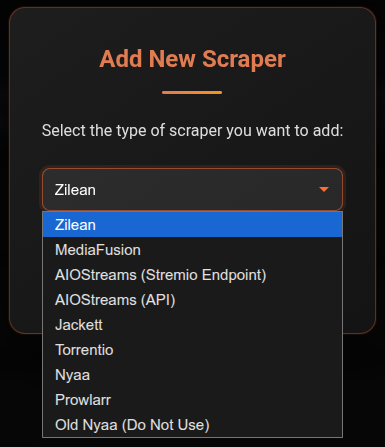
Available scrapers
| Scraper | Best for | Setup required |
|---|---|---|
| Zilean | Fast debrid cache lookups, upgrades | URL only |
| Torrentio | General movies and TV | URL only |
| MediaFusion | Configurable multi-source | Web configurator |
| AIOStreams | Aggregates multiple Stremio addons via one endpoint | URL or API |
| Jackett | Any tracker via one interface | Self-hosted |
| Prowlarr | Multiple trackers, *arr ecosystem | Self-hosted |
| Nyaa | Anime | No setup |
| Newznab | Usenet NZB indexers | URL + API key |
Recommended starting point
Start with Zilean + Torrentio. Zilean checks what's already in your debrid cache (instant, no download needed). Torrentio covers a broad range of content. Add more scrapers if you need specific trackers or better anime coverage.
Usenet support
Newznab scrapers return NZB results delivered via Decypharr. See the Newznab page and the Usenet Migration guide for full setup instructions.
How scrapers work together
When CLI_Debrid searches for a title, it queries all enabled scrapers simultaneously. Results from all scrapers are combined into one pool, then ranked by your Version quality score. The highest-scoring result that passes all your filters wins.
Adding a scraper
- Go to Settings → Scrapers
- Click Add Scraper and select the type
- Fill in the required fields (URL, API key, etc.)
- Toggle Enabled on
- Click Save Settings