Versions
Versions are quality profiles — they define exactly what cli_debrid should look for when scraping. Each content source is assigned a version, and cli_debrid will only accept results that match the profile's criteria.
You can create as many versions as you need and assign different ones to different content sources.
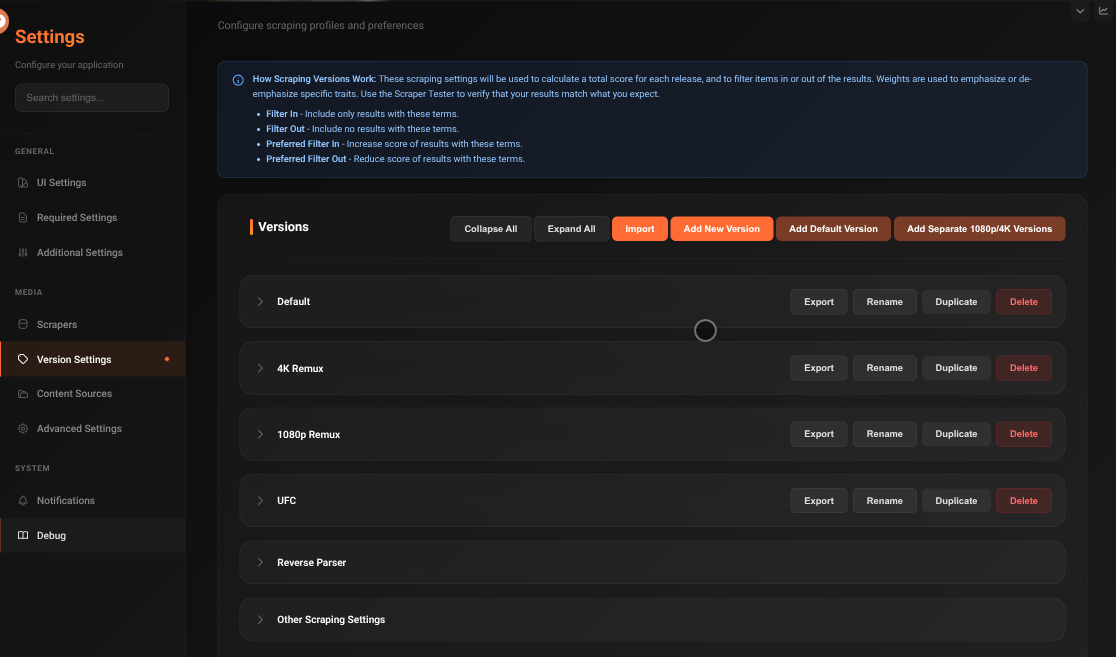
Default versions
cli_debrid ships with a Default version pre-configured for balanced quality (1080p WEB-DL). You can edit this or create new ones.
Creating a version
- Go to Settings → Content Sources → Versions tab
- Click Add Version
- Give it a name (e.g.
4K HDR,1080p,Anime 720p) - Configure the settings below
- Save
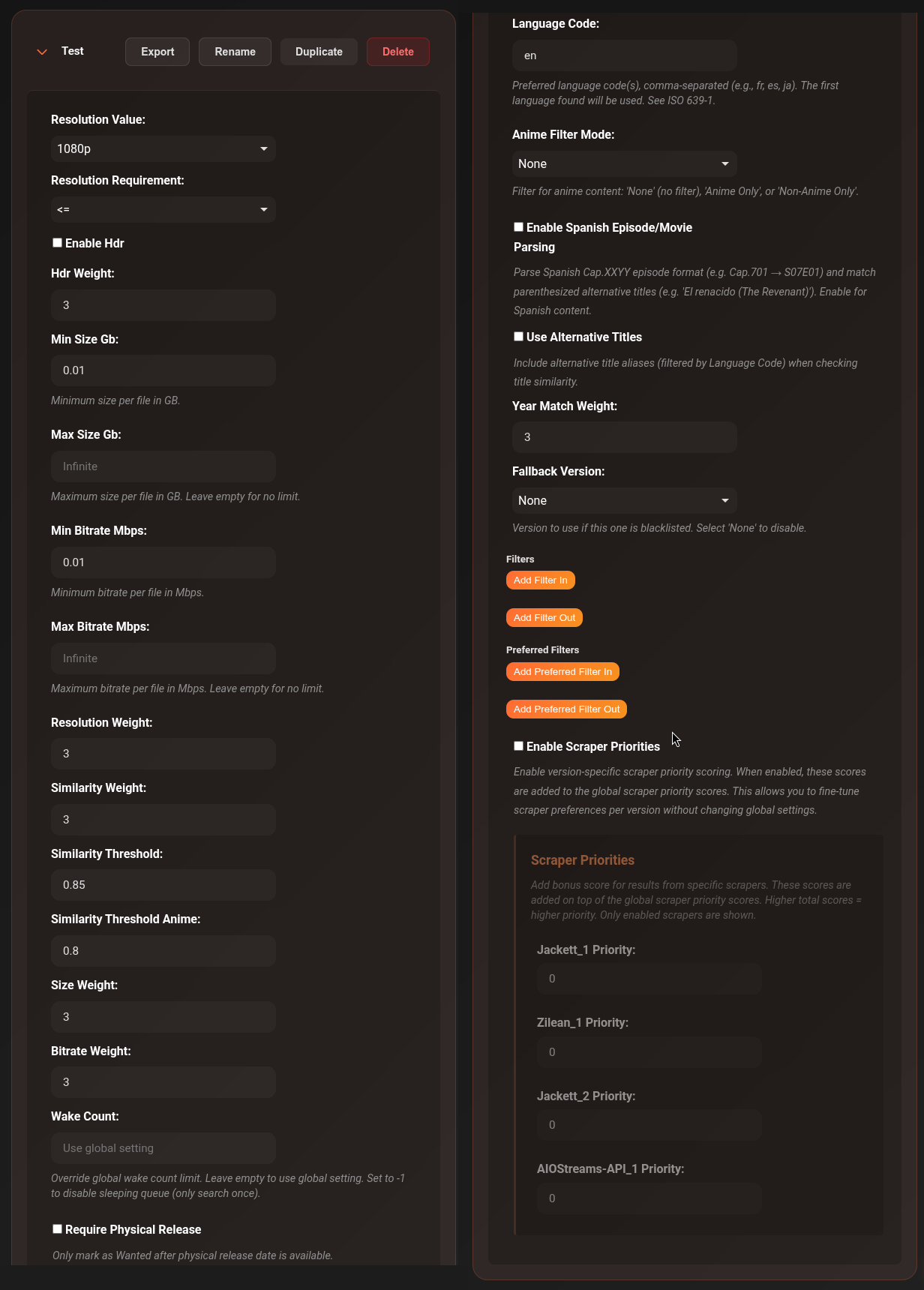
Resolution settings
| Setting | Options | Default | Description |
|---|---|---|---|
| Max Resolution | 2160p, 1080p, 720p, SD |
1080p |
The target resolution |
| Resolution Wanted | ==, <=, >= |
== |
How strictly to match the resolution |
Resolution Wanted explained:
==— Exactly this resolution. A 1080p version will only accept 1080p files.<=— This resolution or lower. A 1080p version will accept 1080p, 720p, or SD.>=— This resolution or higher. A 1080p version will also accept 4K.
HDR
| Setting | Default | Description |
|---|---|---|
| Enable HDR | Off | Prefer HDR content (HDR10, HDR10+, Dolby Vision, HLG) |
| HDR Weight | 1.0 |
How much to boost the score for HDR results (higher = stronger preference) |
File size
| Setting | Default | Description |
|---|---|---|
| Min Size (GB) | 0.0 |
Reject files smaller than this. Useful to avoid low-quality small encodes. |
| Max Size (GB) | (no limit) | Reject files larger than this. Useful to keep storage under control. |
| Soft Max Size | Off | If enabled and no results fit within Max Size, accept the smallest available result instead of failing. |
Bitrate
| Setting | Default | Description |
|---|---|---|
| Min Bitrate (Mbps) | 0.01 |
Reject files below this bitrate |
| Max Bitrate (Mbps) | (no limit) | Reject files above this bitrate |
Scoring weights
These control how much each factor contributes to the final quality score. Higher value = more important.
| Setting | Default | Description |
|---|---|---|
| Resolution Weight | 1.0 |
How much resolution matching affects the score |
| Similarity Weight | 1.0 |
How much title similarity affects the score |
| Size Weight | 1.0 |
How much file size preference affects the score |
| Bitrate Weight | 1.0 |
How much bitrate preference affects the score |
| Year Match Weight | 3 |
How much the release year matching affects the score (default higher because wrong year = wrong content) |
Title matching
| Setting | Default | Description |
|---|---|---|
| Similarity Threshold | 0.85 |
Minimum title match score (0.0–1.0). Below this, the result is rejected. 0.85 = 85% similar. |
| Similarity Threshold (Anime) | 0.80 |
Lower threshold for anime titles, which often have different romanisations. |
Content type filter
| Setting | Options | Default | Description |
|---|---|---|---|
| Anime Filter Mode | None, Anime Only, Non-Anime Only |
None |
Restrict this version to only anime or only non-anime content |
| Require Physical Release | Off | — | Only accept results that have had a physical (BluRay) release |
Filter terms
Use these to require or exclude specific words in torrent titles.
| Setting | Default | Description |
|---|---|---|
| Filter In | (empty) | Torrent title MUST contain at least one of these terms |
| Filter Out | (empty) | Torrent title must NOT contain any of these terms |
| Preferred Filter In | (empty) | Boost score if title contains these terms (soft preference) |
| Preferred Filter Out | (empty) | Reduce score if title contains these terms |
Examples:
- Filter Out:
CAM, TS, HDCAM— reject all cam rips - Filter In:
REMUX— only accept remux files - Preferred Filter In:
DV, DoVi— prefer Dolby Vision when available - Filter Out:
dubbed, DUBBED— reject dubbed audio releases
Language settings
| Setting | Default | Description |
|---|---|---|
| Language Code | en |
Preferred language (ISO 639-1 code, e.g. en, fr, ja) |
| Enable Spanish Episode Parsing | Off | Converts Spanish episode naming (Cap.XXYY) to standard format |
| Use Alternative Titles | Off | Search using translated/alias titles for international content |
Scraper priorities
| Setting | Default | Description |
|---|---|---|
| Enable Scraper Priorities | Off | Use different priority scores per scraper for this version |
| Scraper Priorities | (empty) | Per-scraper priority multipliers. Format: scraper name → score. Higher score = higher priority. |
Example use: Give Zilean a higher priority than Jackett for a 4K version, since Zilean is faster and checks the cache directly.
Fallback version
| Setting | Default | Description |
|---|---|---|
| Fallback Version | None | If no results are found for this version, try this other version instead |
Example: Set a 4K version's fallback to 1080p — cli_debrid first looks for 4K, and if nothing is found, tries 1080p.
Wake count
| Setting | Default | Description |
|---|---|---|
| Wake Count | (global setting) | How many times a sleeping item is retried before giving up. Leave empty to use the global default. Set -1 to disable sleeping for this version entirely. |
Other scraping settings
These global settings apply across all versions and control scraping behaviour, upgrading, and content filtering. They are found at the bottom of the Versions page under Other Scraping Settings.
Uncached content
| Setting | Default | Description |
|---|---|---|
| Uncached Content Handling | None |
How to handle uncached torrents. None — only take the best cached result. Hybrid — take the best cached result, and if no cached results are found take the best uncached result. Full — take the best result whether cached or uncached. |
| Accept Uncached Within Hours | 0 |
If an item was released within the last X hours, accept uncached releases regardless of the above setting. Set to 0 to disable. |
Scraping
| Setting | Default | Description |
|---|---|---|
| Filter Trash Releases | On | Filter out releases flagged as trash by the parser (typically low-quality or badly formatted releases) |
| Minimum Scrape Score | 0.0 |
Minimum calculated score for a result to be accepted. Based on version weights. Set to 0.0 to accept any score. |
| Scraper Timeout | 5 |
Timeout in seconds for each scraping request. Set to 0 to disable. Increase for slower scrapers like AIOStreams. |
| Disable Adult | On | Filter out adult content |
| Trakt Early Releases | Off | Check Trakt for early release information |
| Trakt Rate Limit Enabled | On | Enable Trakt API rate limiting to prevent 429 errors. Automatically detects VIP/Free tier. Recommended to leave enabled. |
Upgrading
| Setting | Default | Description |
|---|---|---|
| Enable Upgrading | Off | Allow cli_debrid to replace a collected item with a better version if one is found |
| Upgrading Percentage Threshold | 0.1 |
How much better a result must be to qualify as an upgrade (decimal, 0.0–1.0). 0.1 = must score at least 10% higher than the current file. |
| Delayed Upgrade Scrape Days | 0 |
Number of days to wait before attempting a single upgrade scrape on an item. Set to 0 to disable. |
| Enable Upgrading Cleanup | Off | Remove the original file from your Debrid Provider after a successful upgrade |
Assigning versions to content sources
Each content source has a Versions checkbox list. Check all versions that should apply to that source.
When multiple versions are checked, cli_debrid tries each one in priority order and uses the best match found.
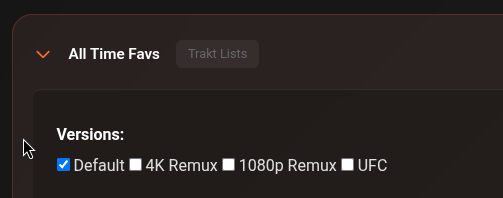
Version actions
At the top of the Versions page:
| Button | Description |
|---|---|
| Import | Import a version profile from a .json file |
| Add New Version | Create a blank version from scratch |
| Add Default Version | Add a pre-configured version with recommended default settings |
| Add Separate 1080p/4K Versions | Add two versions at once — one optimised for 1080p and one for 4K HDR |
On each individual version:
| Button | Description |
|---|---|
| Export | Download this version as a .json file to back up or share |
| Rename | Rename the version |
| Duplicate | Create a copy of the version |
| Delete | Permanently delete the version |
Example profiles
Here are some real-world configurations from the community to show how the settings work together.
Good starting point. Accepts 1080p and above, prefers quality groups, blocks cam rips and low-quality sources.
| Setting | Value |
|---|---|
| Max Resolution | 1080p |
| Resolution Wanted | >= (1080p or higher) |
| HDR | On |
| Min Size | 0.01 GB |
| Similarity Threshold | 0.8 |
| Filter Out | CAM, HDTS, TS, dubbed, 3D, 720p, 480p, MP4, scene site watermarks |
| Preferred Filter In | REMUX (1000), 2160p (500), FGT/FraMeSToR (quality groups), HDR variants |
| Preferred Filter Out | Upscaled, torrenting site watermarks |
Exact 1080p only — no 4K, no HDR, no x265. High weight on size and bitrate. Falls back to 720p if nothing found.
| Setting | Value |
|---|---|
| Max Resolution | 1080p |
| Resolution Wanted | == (exact) |
| HDR | Off |
| Min Size | 0.2 GB |
| Fallback Version | 720p |
| Similarity Threshold | 0.9 |
| Filter Out | HDR, 3D, YTS, MULTI, x265/HEVC, AV1, dubbed audio groups |
| Preferred Filter In | Premium release groups (FraMeSToR 800, FLUX/FGT 600), streaming sources (AMZN, NF, ATVP) |
| Preferred Filter Out | AV1 (500), x265/HEVC (400+), foreign dub groups |
Strict 4K remux only. Requires REMUX in the title. High size weight to prefer larger, higher quality files. Zilean and Jackett get priority.
| Setting | Value |
|---|---|
| Max Resolution | 2160p |
| Resolution Wanted | == (exact) |
| HDR | On |
| Min Size | 0.1 GB |
| Filter In | REMUX (required) |
| Preferred Filter In | REMUX (1000), 2160p (500), FGT/FraMeSToR quality groups |
| Scraper Priority | Zilean (1000), Jackett (1000) — prioritise cache and direct indexer |
Targets 2160p and above with strong HDR preference. High resolution weight, prefers REMUX and premium encode groups. Blocks SDR, dubbed, WEBRip, and upscales.
| Setting | Value |
|---|---|
| Max Resolution | 1080p |
| Resolution Wanted | >= (1080p or higher) |
| HDR | On |
| Resolution Weight | 100 (dominant factor) |
| HDR Weight | 20 |
| Wake Count | 48 (retries many times before giving up) |
| Filter Out | CAM, Telesync, 3D, upscaled variants |
| Preferred Filter In | REMUX (200), HDR10+/DV variants (50), TRUEHD/ATMOS (30), IMAX (30) |
| Preferred Filter Out | SDR (10), dubbed (30), WEBRip (50) |
Tips from the community
- Boost resolution weight (e.g.
100) if you want resolution to dominate all other scoring factors - High size weight (e.g.
10–15) helps pick larger, higher-bitrate files over compressed encodes - Filter In: REMUX is the most reliable way to guarantee a remux-only version — don't rely on preferred filters alone
- Preferred Filter In with high scores (500–1000) for trusted release groups acts as a soft allowlist without blocking everything else
- Fallback versions are essential for strict profiles — a
4K Remuxversion with no fallback will leave items sleeping if no remux exists - Wake Count
0uses the global default; set-1to disable sleeping entirely for a version; set higher (e.g.48) for rare content that needs more retries
Community versions
The cli_debrid Discord has a dedicated channel where users share and download version profiles. You can export your version and drop it in the channel, or grab one optimised for a specific use case (4K HDR, remux only, anime, small sizes, etc.).