Queues
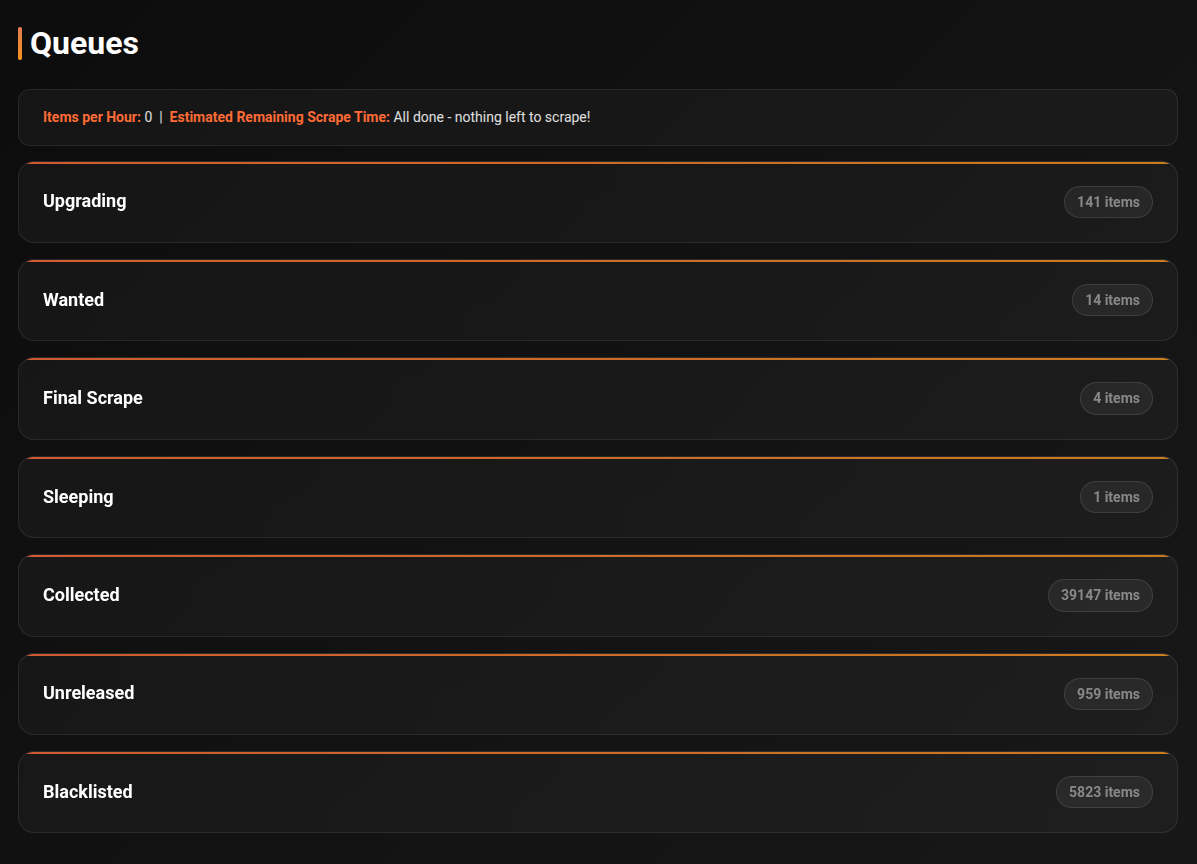
The Queues page shows the real-time status of every item being processed by cli_debrid. Each item moves through a series of states from discovery to collection.
How it works
cli_debrid runs a continuous loop. On each cycle it:
- Checks all enabled Content Sources for new items and adds them to Wanted
- Scrapes all configured scrapers simultaneously to find torrents for Wanted items
- Scores results against your Version settings — resolution, filters, codec preferences — and submits the best match to your debrid provider
- Checks whether the file is available at your mount path
- Marks items as Collected, notifies your media server, and applies labels/overlays
Processing pipeline
Queue states
Wanted
Items that need to be scraped — waiting for their turn in the scraping loop. Items also land here if their release date hasn't arrived yet.
Scraping
cli_debrid is actively searching your configured scrapers for a matching torrent.
Adding
A torrent has been found and is being submitted to your debrid provider.
Checking
The item has been added to debrid. cli_debrid is monitoring it:
| Sub-state | Description |
|---|---|
| Cached | Already in debrid cache — checking for local file presence |
| Downloading | Being downloaded to the debrid server — shows progress % |
Once the file appears at the mount path, the item is marked Collected, your media server is notified, and labels/overlays are applied if configured.
Unreleased
The item has a known future release date. cli_debrid will automatically move it to Wanted after release.
Sleeping
All available torrents for this item have been tried and blacklisted. The item will automatically retry when the blacklist duration expires.
Pending Uncached
Found a torrent but it's not cached on the debrid service. Waiting for an uncached download slot.
Final Scrape
A last-attempt scrape for items that have been trying for a while.
Blacklisted
Explicitly ignored — either manually or after repeated failures. Won't be retried unless manually cleared.
Reading the queue
Each queue section is collapsible. The item count is shown in the header.
Click the ▶ arrow next to any item to expand its details:
- Torrent title
- File path
- Hash
- Scraper source
- Time in current state
Checking queue — progress display
Items in the Checking state show live download progress when being downloaded from debrid.
Toggle the Show Filename button to switch between showing the torrent title and the matched file path.
Processing intervals
cli_debrid processes each queue on its own schedule. These are the default intervals:
Queue intervals
| Queue | Default interval | Description |
|---|---|---|
| Wanted | 60s | Moves items to Scraping or Unreleased |
| Scraping | 1s | Searches scrapers, moves to Adding or Sleeping |
| Adding | 1s | Submits to debrid provider, moves to Checking or Sleeping |
| Checking | 30s | Monitors file availability at mount path |
| Sleeping | 5 min | Retries items that haven't been found yet |
| Unreleased | 5 min | Checks if release date has passed |
| Upgrading | 1 hr | Scrapes for quality upgrades for recently collected items |
| Blacklisted | 2 hrs | Periodically reviews blacklisted items |
| Pending Uncached | 1 hr | Waits for uncached debrid downloads |
| Final Check | 15 min | Last-attempt scrape for long-waiting items |
| Pre-release | 24 hrs | Handles pre-release content |
Tip
All intervals can be customised from the Task Manager page.
Upgrading queue
Items enter the Upgrading queue when they are successfully collected and were released recently. cli_debrid scrapes for better quality versions every hour.
By default, items remain in the Upgrading queue for 24 hours after collection before being considered fully settled. This duration is configurable in Advanced Settings → Upgrade Queue Duration.
Sleep and wake mechanism
Items that can't be found go to Sleeping. Each time an item wakes and is retried without success, its wake count increments.
| Setting | Default |
|---|---|
| Sleep duration | 30 min |
| Wake limit | 24 attempts |
When the wake limit is reached, the item moves to Blacklisted. Items with a release date older than one week are also blacklisted immediately.
The wake limit is configurable per Version (set to -1 to skip sleeping and blacklist immediately) and globally in Settings → Queue → Wake Limit.
Blacklisting
Items are blacklisted when:
- They exceed the wake limit
- Their release date is more than one week old and were never found
Blacklisted items are not retried unless you manually clear them (Library page) or have Blacklist Duration enabled in settings, which automatically unblacklists items after a set period.
Multi-pack processing
When a multi-pack result (e.g. a full season pack) is found and added:
- The original item moves to Checking
- All matching episodes currently in Wanted, Scraping, or Sleeping are also moved to Checking
- All affected items are added to the Upgrading queue for potential future upgrades
Troubleshooting
Item stuck in Wanted
cli_debrid is searching but finding nothing:
- No scrapers configured or reachable — check the Connections page
- Content doesn't exist on your scrapers yet (new release, obscure title)
- Version settings are too strict — try loosening filters
Item stuck in Checking
The file was added to debrid but isn't appearing at the mount path:
- Your Zurg/rclone or Decypharr mount isn't working — check you can browse the mount path
- The file is still downloading (uncached) — wait for it to complete
- Wrong mount path in Required Settings → Original Files Path
Item moves to Sleeping
All known torrents have been tried and blacklisted. cli_debrid will retry when the blacklist expires. To retry immediately, clear the blacklist from the Library page.
Processing cycle timing
The main loop runs every 60 seconds by default (configurable in Scraping settings). For large libraries with many Wanted items, a single cycle may take several minutes.