Plex Label Manager
The Plex Label Manager automatically labels your Plex items based on which content source added them, or who requested them via Seerr. This lets you create Plex smart collections and see at a glance where content came from.
What are Plex labels?
Plex labels are tags applied to movies and TV shows in your Plex library. cli_debrid manages these automatically based on your content source configuration. Use them to:
- Track requesters — see who requested each item (e.g.
Requested by John) - Identify sources — know which source added an item (e.g.
Overseerr,Trakt: Family Movies) - Create smart collections — use Plex's smart filter feature to build persistent filtered views
- Monitor usage — track which users are actively requesting content
Label modes
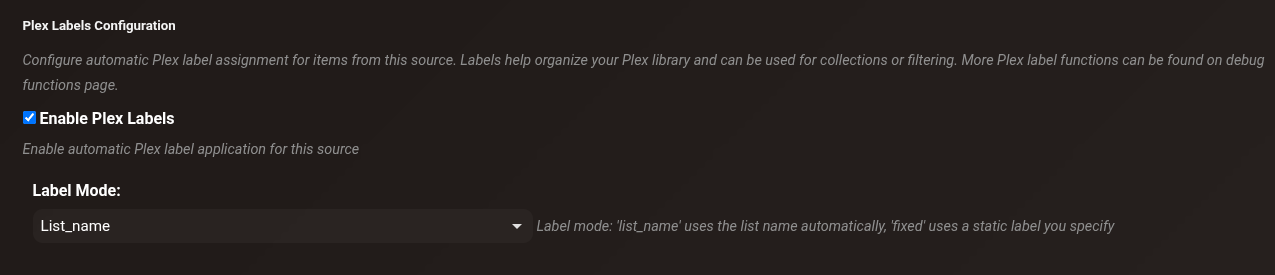
Configure the label mode per content source in Settings → Content Sources → [Source] → Plex Labels:
| Mode | Label applied | Example |
|---|---|---|
| List Name | The content source's display name | Trakt Watchlist, MDBList Sci-Fi |
| Fixed | A custom label you define | Auto-Downloaded |
| Requester | Seerr requester's username | john, alice |
How labels are applied
Labels are applied in two ways:
- During collection — when an item is successfully collected, labels are generated and synced to Plex immediately
- Manual sync — use the utilities in Debug Functions to sync labels for existing items
Utilities (Debug Functions)
Access all label management tools from Debug Functions → Plex Label Management.
View Items by Label
Search for all items in your library that have a specific label applied. Useful for auditing label application and verifying which items are tagged.
Bulk Apply Labels from Source
Retroactively apply labels from a specific content source to all matching collected items. Use this after enabling Plex labels for a source that already had collected items.
How: Select a source from the dropdown → Preview to see what will be labelled → Apply Labels
Bulk Remove Labels
Remove a specific label from all items in the database and Plex. Use when disabling a source, renaming a label, or cleaning up old labels.
How: Enter the label name → Preview → Remove Label
Orphaned Label Cleanup
Finds and removes labels that are tracked in the database but whose content source no longer exists or has been disabled. Keeps your Plex label list clean.
How: Find Orphaned Labels → Cleanup
Sync Labels from Content Sources
Re-syncs all labels based on current content source configurations. Applies labels to all Collected items from sources that have Plex labels enabled.
Sync functions (Debug Functions → Run Task Manually)
| Function | Processes | Updates DB? | Syncs to Plex? | Time | Use case |
|---|---|---|---|---|---|
| Sync Plex Labels | Collected items due for sync | ✅ Labels | ✅ | Minutes | Automatic periodic sync (every 30 min) |
| Backfill Plex Labels Content Source Detail | Items with NULL/Unknown requester | ✅ Requester names only | ❌ | Minutes | Fix missing requester names |
| Sync Labels from Content Sources (Full - All Items) | ALL items (5000+) | ✅ Labels | ✅ | 13–14 hours | Initial setup, after config changes |
| Sync Labels from Content Sources (Incremental - Last 7 Days) | Changed/new items (~5–30) | ✅ Labels | ✅ | 5–15 minutes | Routine maintenance |
| Backfill Missing Labels | Items with NULL/empty labels | ✅ Labels | ✅ | Varies | Catch-up, error recovery |
Sync Plex Labels
Scheduled task
Runs automatically every 30 minutes by default. Adjust the interval or trigger manually in the Task Manager under the Features tab.
The automatic periodic task that runs in the background. Syncs labels for Collected items that are due for a sync. You can also trigger it manually to force an immediate sync without waiting for the next scheduled run.
Backfill Plex Labels Content Source Detail
Queries the Overseerr API to retrieve actual requester names for items showing "Unknown" and updates the database. Does not sync labels to Plex — only updates the database.
Use when: upgrading from an older version that didn't track requester names, or after restoring from a backup with incomplete data.
Sync Labels from Content Sources (Full - All Items)
Processes all collected items, regenerates labels from current content source data, and syncs all labels to Plex. Sets timestamp tracking for future incremental syncs.
Full sync is slow
Processing 5000+ items at 2–3 items/second takes 13–14 hours. Schedule overnight. Progress is logged every 20 items — monitor in the Logs page. Safe to restart if interrupted — won't duplicate labels.
Sync Labels from Content Sources (Incremental - Last 7 Days)
Only processes items that have never been synced (plex_labels_last_synced = NULL) or were collected in the last 7 days. Typically completes in 5–15 minutes — recommended for routine maintenance.
Backfill Missing Labels
Finds items with a NULL or empty labels field, generates labels from their content source data, and syncs to Plex. Non-destructive — preserves existing labels on other items. Safe to run multiple times.
Recommended workflows
Initial setup
- Configure label settings in Settings → Content Sources
- Run Backfill Content Source Detail (5–15 min) — fills in requester names
- Run Full Sync (13–14 hours — run overnight)
- Verify in Plex that labels appear correctly
Routine maintenance
- Daily or weekly: Run Incremental Sync (5–15 minutes)
- As needed: Run Backfill Missing Labels if any items are missing labels
After configuration changes
- Optionally run Backfill Content Source Detail if requester data may have changed
- Run Full Sync to ensure all items reflect the new configuration
Using labels in Plex
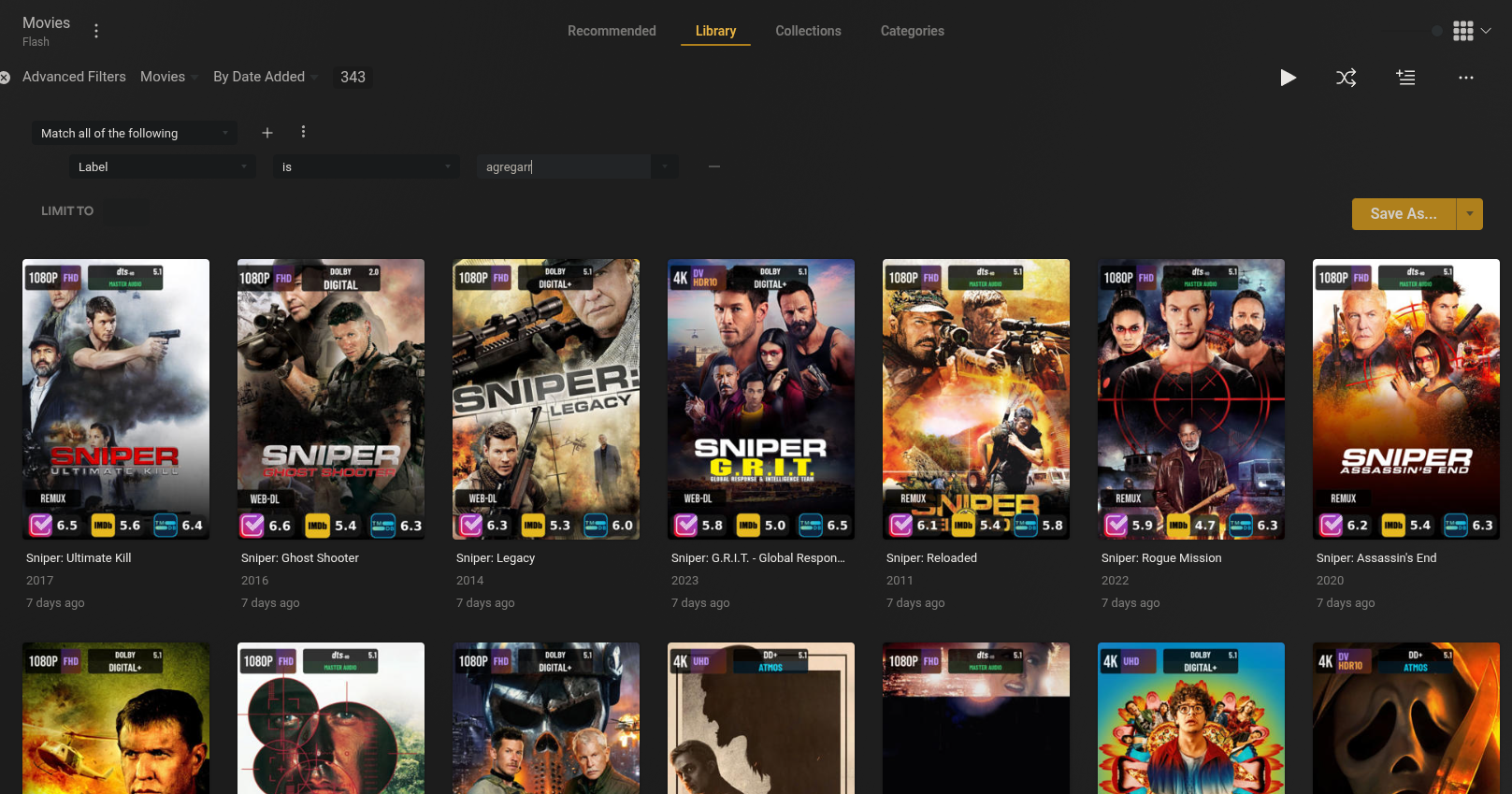
Once labels are applied you can filter by them in Plex:
- In your library, click All → Filters
- Select Label → choose your label
- Save as a Smart Collection for a persistent filtered view
Examples: - "Requested by Alice" - "From Trakt Watchlist" - "From MDBList Horror"
Troubleshooting
Labels not appearing in Plex
- Check Settings → Content Sources — verify labels are enabled for the source
- Run Backfill Content Source Detail
- Run Full Sync
- Force a metadata refresh in Plex
Labels show "Unknown" instead of names
- Run Backfill Content Source Detail — fetches actual names from Overseerr
- Run Full Sync — applies updated names to Plex
Some items have labels, others don't
- Run Backfill Missing Labels — catches items with NULL labels
- Check logs for errors about specific titles
- Verify the items exist in Plex
Full sync taking too long
- This is expected — 5000+ items at 2–3 items/second = 13–14 hours
- Let it run overnight and monitor progress in the Logs page
- Use Incremental Sync for all future routine maintenance
Technical notes
- TV shows: Labels are applied at the show level, not per episode. Processing 100 episodes of a show makes only 1 API call to Plex.
- Rate limiting: Processes ~2–3 items/second to avoid overwhelming the Plex API.
- Database fields:
content_source,content_source_detail,plex_labels(JSON),plex_labels_last_synced(timestamp for incremental mode).
Custom sync interval (API)
To sync items from a custom window instead of the default 7 days: